🚀 Visitor Management System for Offices: Complete Guide to Setup, Features, Process & Benefits
In today’s fast-growing workplace environment, maintaining security, professionalism, and smooth visitor flow has become essential for organizations. A Visitor Management System (VMS) is a powerful digital tool that replaces traditional pen-and-paper registers with a modern, automated, and secure check-in process.
Whether you run a corporate office, co-working space, factory, school, hospital, or government office, a VMS helps you manage all visitors efficiently.
🧩 What is a Visitor Management System?
A Visitor Management System is a software-based solution that manages and tracks all kinds of visitors such as clients, vendors, interview candidates, delivery staff, etc.
It records visitor details, generates digital passes, notifies employees, and ensures a professional and secure entry process.
🎯 Why Offices Need a Visitor Management System
Traditional registers are slow, insecure, and unprofessional.
A VMS solves all major problems:
✓ Increases office security
✓ Eliminates manual paperwork
✓ Speeds up check-ins
✓ Maintains digital logs
✓ Improves visitor experience
✓ Helps in audits & compliance
✓ Reduces front-desk workload
⭐ Key Features of a Professional Visitor Management System
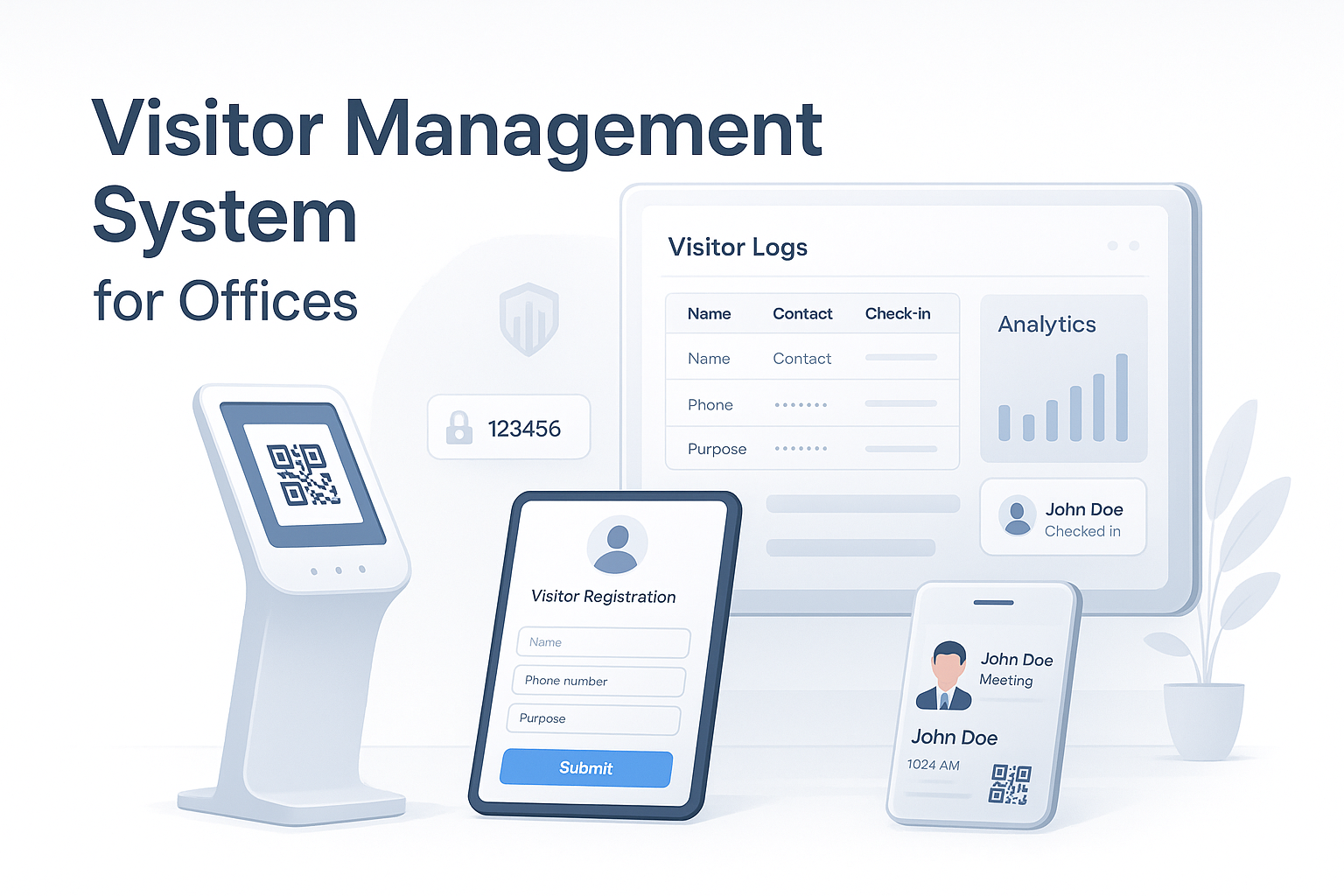
1. Smart Check-in (QR or Touchscreen Kiosk)
Visitors can check in using:
QR code scan
Tablet kiosk at reception
Pre-invite link shared by the host
Mobile OTP verification
2. Employee/Host Notification
When a visitor checks in, the system alerts the employee via:
SMS
WhatsApp
Email
Mobile app notification
3. Auto Visitor Badge / Pass
Visitors receive:
Digital pass (SMS/WhatsApp)
Printable ID badge with name, photo, purpose & time
4. Pre-Registration & Invite System
Employees can pre-register visitors, and visitors get:
Meeting details
QR code invitation
GPS directions
5. Secure Visitor Logs
Automatic record of:
Name
Contact number
Company
Check-in & check-out time
Whom they visited
Purpose of visit
6. Photo Capture & ID Upload
Capture visitor photo or verify ID documents for security.
7. Multi-Location & Multi-Gate Support
Ideal for large offices and corporate campuses.
8. Real-time Dashboard & Reports
Exportable reports for:
Daily visitor count
Peak visiting hours
Security audit data
Repeat visitor logs
9. Integration Support
Integrates with:
Access control
HRMS
CRM
Attendance systems
ERP
🔧 How the Visitor Management System Works (Step-by-Step Process)
Step 1: Visitor Arrives at the Office
Sees a digital kiosk or QR code at reception.
Step 2: Easy Check-In
Visitor enters details:
Name
Phone number
Purpose
Company
Photo / ID
Step 3: Verification
System verifies:
OTP
Pre-invite
Registered details
Step 4: Notification to Host
Employee receives instant notification with visitor info.
Step 5: Badge/Pass Generation
Digital or printed visitor pass is generated.
Step 6: Meeting Happens
Step 7: Check-Out
Visitor taps check-out or scans QR when leaving.
Step 8: Data Stored Securely
All logs saved for future audits.
🏢 Industries That Can Use Visitor Management Systems
Corporate Offices
IT Companies
Government Offices
Co-working Spaces
Hospitals & Clinics
Schools & Colleges
Manufacturing Plants
Banks
Hotels & Resorts
💼 Benefits for Offices
✔ Increased Security
Stops unauthorized entries.
✔ Professional Experience
Makes your office look modern and organized.
✔ Faster Operations
Automated workflows reduce reception workload.
✔ Accurate Record Keeping
Digital logs ensure better compliance.
✔ Reduced Paperwork
Eco-friendly solution.
✔ Better Data Insights
Track visitor patterns and manage capacity.
📦 Modules You Can Include in Your VMS Product
Visitor check-in module
Employee Directory
Analytics dashboard
Admin panel
Email/SMS gateway
Access control integration
Multi-branch support
Digital signature
NDA/Agreement signing
💰 Revenue Model – How You Can Earn Money
1. Subscription Plans (SaaS Model)
Basic
Standard
Premium
2. Add-on Services
Extra locations
Extra users
Advanced reports
Custom branding
3. One-time setup fee
4. Hardware Sales
Tablets
Kiosks
QR stands
Printers
📣 Marketing Strategy to Sell This System
1. Google Ads + Facebook Ads
Target:
Offices
Startups
Corporates
2. LinkedIn Outreach
Message HR managers, Admin heads, Facility managers.
3. Cold Emailing
Share demo video + pricing.
4. YouTube Explainer Video
Show a 1-minute demo of the system.
5. Partnerships with Security Agencies
They can resell your software.
📌 Final Thoughts
A Visitor Management System is a high-demand SaaS product with huge market potential. Offices want to adopt digital, secure, and smooth systems.
If you build this system with the right features, clean UI, and strong marketing, you can easily sell it to hundreds of businesses.